
Best Offline Medication Tracker Apps for Seniors in 2025
Finding a reliable medication tracker app for seniors offline can feel impossible when most apps fail the moment you walk into a doctor’s office with spotty Wi-Fi. For decades, the handwritten list was the gold standard because it always worked. The modern push to digitize health has created a paradox: we’ve built sophisticated apps that fail at the exact moment they’re needed most. The most critical feature of a health app isn’t its reminder chime or its data charts; it’s its ability to function reliably when infrastructure fails. After researching dozens of health apps, one pattern stands out: they are built for the developer’s convenience (cloud sync, user analytics) rather than the patient’s reality (poor clinic Wi-Fi, privacy concerns, and a need for tangible records).
This guide cuts through the hype to show you the non-negotiable features of a truly patient-centric solution. We’ll help you find an app that lets seniors manage complex regimens with confidence and dignity, starting with the core problems with mainstream trackers.

Why Cloud-Based Medication Trackers Are a Medical Liability
The architecture of most apps creates inherent points of failure that are unacceptable for managing health. Consider the standard flow: you log a pill, it syncs to a company server, and that data is then available on your other devices. This seems convenient until you unpack the risks.
When your health data lives on a company’s server, you are no longer its custodian. You become a data tenant. This creates three critical vulnerabilities:
- Access Failure: Clinic and hospital Wi-Fi is notoriously unreliable. Needing a signal to review your medication history during a consultation is a design flaw.
- Privacy Erosion: Health data is the most sensitive personal information. Cloud-based apps turn your diagnosis history into a business asset stored and analyzed by others.
- Service Dependency: What happens to your health journal if the startup behind the app shuts down? Cloud apps can vanish, taking your data with them.
The table below contrasts the priorities of a cloud-first architecture versus a patient-first, local approach.
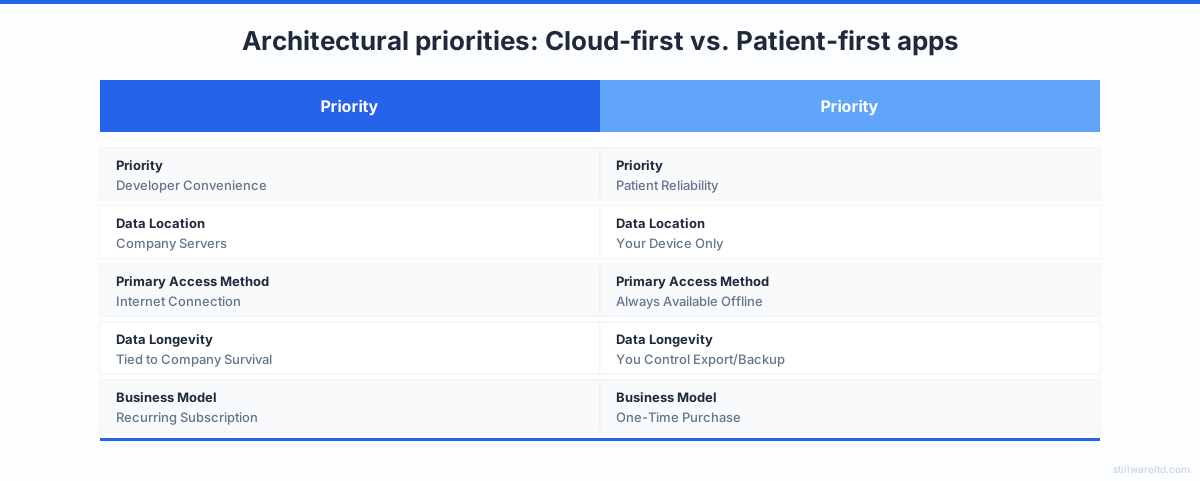
We believe health tools should work offline by default. The core function of a medication tracker—recording what you took and when—does not require an internet connection. Syncing should be optional and user-controlled, not a mandatory gateway to your own information.
4 Non-Negotiable Features for a Senior-Friendly Offline Tracker
For an app to be genuinely useful for seniors, it must solve for the physical and cognitive realities of aging. Flashy features are distractions. These four elements are essential for any offline medication tracker app for seniors.
1. Simplicity Over Complexity The interface must be immediately legible. This means high-contrast color schemes, large typography, and minimal taps to log a medication. No nested menus or confusing icons.
2. The Printable PDF as a Primary Feature The ability to generate a clean, readable PDF is the bridge between digital and physical healthcare. A good report lists medications, dosages, schedules, and notes clearly on a standard sheet of paper.
3. Truly Local Reminders Reminders must work without any cloud service ping. They should use the device’s local notification system so your pill alert sounds even if your home internet is down.
4. Ownership and Portability Your health history should not be held hostage by an app’s proprietary database. You must be able to export your data to standard formats like CSV or PDF. This ownership is the ultimate guarantee of control.

3 Myths About Offline Health Apps (Debunked)
A shift to local-first tools requires confronting common misconceptions pushed by the subscription software industry.
Myth 1: “Offline apps can’t sync between devices.” False. Syncing can use services you already control, like your personal iCloud or Google Drive. The app company has zero access to the sync channel or the encryption keys. You hold the keys.
Myth 2: “You need the cloud for reliable backups.” Your device’s own backup system (like iPhone backups to iCloud) already secures locally-stored app data. Manually exporting a PDF to your computer is more tangible than trusting a third-party’s opaque systems.
Myth 3: “Cloud apps are more feature-rich and updated.” This confuses business model with technical capability. A one-time purchase app can receive major updates. The subscription model guarantees recurring revenue, not better software.
The average senior manages 4-5 prescription medications daily. The tool they use for this critical task shouldn’t also manage a monthly credit card charge or require a Wi-Fi password to function.
How to Build Your Own Offline Medication System
Until you find the ideal app, you can assemble a robust, private system using tools you already have. This is about using technology intentionally, not going back to paper.
Follow these five steps:
- Choose a Local-First Notes App: Use Apple Notes or Obsidian (with local vaults). Create a dedicated note for your medication list.
- Structure Your Note: Use a simple, consistent format. Example: Medication, Purpose, Schedule, Pharmacy, Notes.
- Leverage Device Reminders: Use your phone’s native Clock or Reminders app to set daily alarms labeled clearly (e.g., “Morning Meds”).
- Create a Weekly PDF Checkpoint: Once a week, take a screenshot or “Print to PDF” of your updated note. Save it to a dedicated folder.
- Secure Your Backup: Ensure your phone backups are on. For extra security, email the weekly PDF to a trusted family member.
This method gives you digital convenience with the offline reliability and absolute privacy of a local document.

The Real Cost of “Free” Cloud Tracking
Most health apps present a Faustian bargain: give us your intimate health data for a “free” service. This data is then anonymized, aggregated, and sold. For a senior, the stakes are higher.
This data can inform insurance risk models or be used for targeted advertising that exploits health anxieties. The value of your aggregated health data far exceeds the few dollars you might save each month. When the product is free, you are the product—and in health tech, you’re a valuable one.
Most apps assume user data is a resource to be collected. A local-first app operates on the opposite principle: health data is a liability for the developer and an asset only for the user. The developer’s job is to protect it from everyone, including themselves.
Your Checklist for Finding a True Offline-First App
Use this checklist to cut through marketing when searching for a dedicated medication tracker app for seniors offline.
- The Airplane Mode Test: Download the app, turn on Airplane Mode, and try to enter and view a medication. If you can’t, it’s cloud-dependent.
- Permission Scrutiny: Be wary of apps asking for “Photos and Media” access or background location data. A pill tracker doesn’t need these.
- Privacy Policy Read-Through: Search for “third-party,” “analytics,” “advertising,” and “share.” A genuine policy will be short and state data is stored locally, not shared.
- Business Model Check: A one-time purchase aligns the developer’s success with your long-term satisfaction. A subscription aligns it with your ongoing payment.

Your medication history is the cornerstone of your medical care. It deserves a home that is permanent, private, and always accessible—especially when the Wi-Fi isn’t. The search for an app that respects your privacy starts with a simple test: turn off the Wi-Fi and see what still works. Give this method a try with your current system, or use our checklist to find a dedicated tool that puts your reliability first.