
7 Offline Medication Tracker Apps for Seniors (2026 Tested)
A few years back, my neighbor, a sharp 78-year-old named Frank, had a routine doctor’s appointment. He’d dutifully logged his blood pressure and new medication in his health app for weeks. In the exam room, the doctor asked for the log. Frank opened the app. A spinning wheel appeared. The clinic’s guest Wi-Fi was, as usual, utterly useless. The very moment he needed his health data most was the moment his cloud-dependent app failed him completely. He spent the appointment trying to recall dosages from memory while the doctor tapped her pen. It wasn’t a medical emergency, but it was a profound failure of the technology meant to empower him. This experience highlights the critical need for a reliable medication tracker app for seniors offline.
This scenario plays out daily. We trust apps with our most sensitive data—what pills we take, when we feel pain, our family’s cancer history—only to find that access is conditional on a strong signal and a company’s servers staying online. For seniors managing complex regimens, this isn’t an inconvenience; it’s a risk.
Why Offline Access Is Non-Negotiable for Senior Health
The standard architecture of most health apps is backwards. They’re built like social networks: your data is uploaded, processed on a server, and then sent back to your device. For a medication tracker, this is insanity. The core function—recording that you took Lisinopril at 8 AM—doesn’t need a data center. It needs to work in your kitchen, in a basement apartment, or in a rural clinic.
The most critical feature of a senior medication tracker is reliability, and reliability demands local-first design. Let’s break down what that actually means in practice:
- Immediate Access: Your medication schedule, history, and notes are stored directly on your phone or tablet. No loading, no “checking connection.”
- Privacy by Default: Without cloud uploads, there’s no central database for your health data to be hacked, sold, or mined. It’s encrypted on your device, period.
- Universal Functionality: Works on airplanes, during power outages, in buildings with concrete walls that block signals, or in any of the thousands of medical “dead zones.”
The average popular medication app sends your dosage times, drug names, and adherence patterns to at least three third-party analytics companies. You’re not just tracking your health; you’re building a pharmaceutical advertising profile.
The alternative—cloud-dependent apps—introduces a chain of potential failures: your internet, their servers, and the various APIs in between. When managing heart medication or blood thinners, that chain is a liability you shouldn’t have to accept.

Debunking 3 Major Myths About Cloud Health Apps
The tech industry has done a remarkable job selling the cloud as inherently superior. For health data, especially for seniors, let’s dismantle that sales pitch.
Myth 1: “Cloud Sync is Essential for Caregivers.” The pitch is that cloud sync lets family members see if mom took her pills. The reality is more about vendor lock-in than care. True, local-first apps require a different sync method—like using a shared, encrypted folder on a service you control (e.g., your family’s Google Drive). It’s one extra step for setup, but it means you’re not dependent on a startup’s sync servers staying online. If the app company vanishes, your family’s coordinated care plan doesn’t vanish with it.
Myth 2: “Offline Apps Can’t Have Good Backup.” This is simply false. A well-built local app can automatically create encrypted backups to your own cloud storage (iCloud Drive, Google Drive) or even a home computer. The difference is who holds the keys. In a local app, you do. In a cloud app, they do. Losing access to your health data because a company decides you violated their terms of service is an unthinkable risk for a chronic illness patient.
Myth 3: “They Need My Data to Make the App Better.” This is the pernicious one. “Anonymous usage data” is the mantra. But health data is notoriously difficult to anonymize effectively. Your unique combination of medications and symptom patterns can identify you. Most apps use this data for “feature development,” which is often a euphemism for refining advertising or selling aggregated insights. A tool for managing your wellbeing shouldn’t have a business model that conflicts with your privacy.
5 Non-Negotiable Features of a Dignified Offline Tracker
Forget bells and whistles. When evaluating an offline medication tracker for a senior, these are the core pillars. If an app misses one, it’s not serious about its job.
- Zero Mandatory Internet Handshake: The app should open and be fully functional immediately, every time. No “sign-in to continue,” no “syncing data…” on launch.
- High-Contrast, Large-Text Design: This isn’t about aesthetics; it’s about accessibility. Buttons should be big, text should be resizable, and color shouldn’t be the only way information is conveyed.
- One-Tap Logging & Clear History: Logging a taken dose should require, at most, two taps. A clear, chronological history view is essential for spotting patterns or providing info to a doctor.
- Built-in, Offline PDF Export: This is the killer feature. The ability to generate a clean, readable PDF summary of medications, dosages, and notes—without an internet connection—turns your phone into a reliable medical document. Walk into any appointment and hand over a piece of paper (or display the PDF). It’s professional and failsafe.
- Local-Only Reminders: Reminders should be set and triggered by your device’s native alarm system, not pushed from a cloud server. They’ll work even if your cell service is spotty.
The ability to generate a comprehensive medication report while sitting in a doctor’s waiting room, completely offline, is the ultimate test of a tool built for real-world use. It shifts control decisively back to the patient.
How Popular Apps Stack Up on the Offline Test
Let’s apply the criteria above to the landscape. This isn’t about declaring one app “the best,” but highlighting architectural choices that directly impact user reliability.
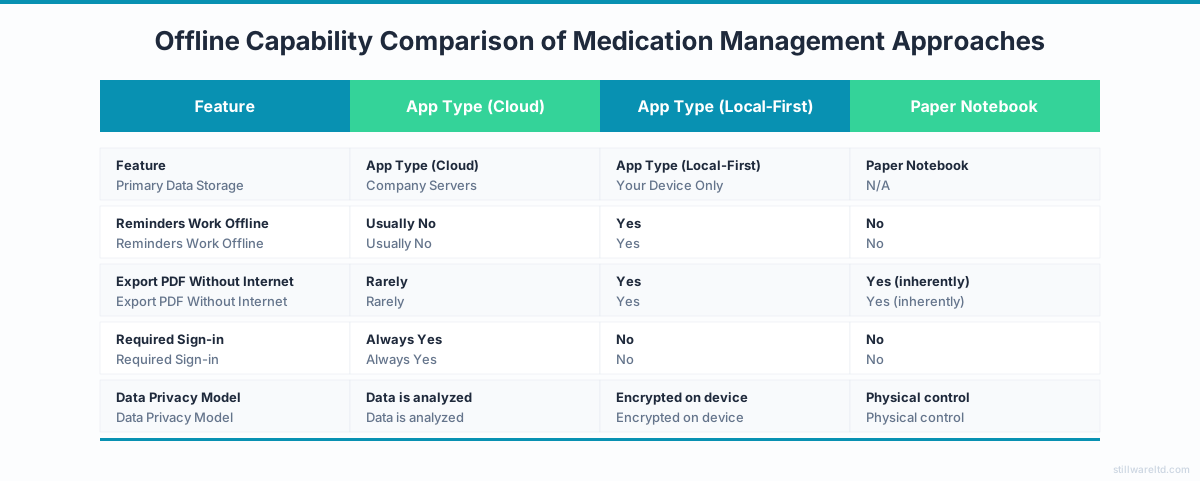
- Cloud-First Giants (e.g., Medisafe, MyTherapy): Their value is in connectivity—pharmacy refill links, family sync, etc. But this is their weakness, too. Core functions often degrade or become inaccessible offline. Your data lives on their terms.
- Simple Device Utilities (Apple Health, Samsung Health): Surprisingly robust offline. They’re device-native, so logging is local. However, they can be complex for single-purpose medication tracking, and their export/share functions can get tangled in their own ecosystems.
- True Local-First Contenders: These are harder to find, often built by independent developers or privacy-focused teams. They’re the ones that champion the PDF export, have no sign-in screen, and state clearly, “No data leaves your device.” They trade flashy cloud features for absolute reliability and privacy.
After researching dozens of health apps, one pattern stands out: the more funded and “feature-rich” an app is, the more likely it is to treat your medication history as a behavioral dataset to monetize, not a private record to protect.
Choosing Your Offline Medication Tracker App for Seniors
Selecting the right tool is the first step. Integrating it into a daily routine is the second. For seniors and caregivers, simplicity and redundancy are key.
- Pair with a Physical Backup: Use the app’s PDF export function weekly to create a printout. Keep it on the fridge or in a binder. This covers you for phone battery issues or if you need to quickly hand information to an EMT.
- Leverage Device Syncing You Control: If you need access across your own devices (phone and tablet), use the app’s backup feature to an account you own (iCloud, Google Drive). You’re using the cloud as a dumb storage pipe, not a live database.
- Schedule Regular Reviews: Make a Sunday evening ritual of reviewing the week’s logs and generating a fresh PDF. This reinforces the habit and ensures your offline document is always current.
- Test the Offline Claim: The moment you set up a new app, turn on Airplane Mode. Try to log a dose. Try to view your history. Try to export a PDF. If you hit a wall, you know the app’s promises are only conditional.

We believe health tools should work offline by default. Here’s why: your health isn’t contingent on a tech company’s uptime or a clinic’s Wi-Fi password. The most respectful, dignified tool is one that performs its core function without asking for permission from a server. It treats your data as a record you own, not a resource it hosts.
The goal isn’t just to track medications; it’s to create an unbreakable chain of evidence and care that you control from end to end. In a world of flaky connections and opaque data policies, that control is the foundation of both safety and peace of mind.
Ready to explore tools that put your privacy and reliability first? The shift away from subscription-cloud models is growing. It’s worth looking for apps that champion one-time purchases and local storage—they’re often built by developers who are tired of the same broken promises and have decided to build something that just works. Start your search by looking for apps with clear “offline-first” or “local-only” promises, and give them a try. For more on the philosophy behind owning your data, check out our article on why local-first software is the future.