
The Study App That Works When Your Wi‑Fi Doesn’t
The average teen spends 8.4 hours a day on screens, yet struggles to find 90 minutes of focused, uninterrupted study time. The problem isn’t a lack of apps; it’s that the apps themselves are part of the distraction economy, built on a foundation of connectivity that constantly pulls you away from the page. The best offline study app for teens isn’t just a tool—it’s a deliberate environment designed to eliminate the very distractions that sabotage deep work. We’re not talking about an app with an “offline mode” as an afterthought. We’re talking about tools engineered from the ground up to function in the library basement, on the school bus with no signal, or in a cabin miles from the nearest cell tower. This is about reclaiming your attention.

Why Offline-By-Design is Non-Negotiable for Learning
After researching dozens of education apps, one pattern stands out: the vast majority treat your study data as a means to their end. Your flashcards, your progress, your annotations—they’re uploaded to a server to power “insights,” “social features,” and “adaptive learning” algorithms. This creates a perverse incentive: the app’s value is tied to your data, not your mastery. When the internet drops, so does your access to the very notes you created.
We believe education tools should work offline by default. Here’s why. True learning requires immersion, a state of flow that’s shattered by a notification, a laggy sync, or the temptation to quickly check a message. An app that requires a connection is an app that cannot guarantee an uninterrupted session. For the student prepping for SATs, A-Levels, or AP exams, this isn’t a minor inconvenience; it’s a critical flaw. The cognitive cost of context-switching from calculus to a ‘connection lost’ dialog is higher than most app developers will ever admit.
Consider these real-world scenarios where offline capability isn’t a bonus—it’s the entire point:
- The Commute: An hour on the bus or train with spotty service is prime study time, but only if your app doesn’t freeze waiting for a signal.
- The School Building: Concrete walls and hundreds of devices often cripple Wi-Fi. Your study hall shouldn’t be dictated by network congestion.
- The Focus Session: Deliberately turning on airplane mode to eliminate distractions only works if your core study tool doesn’t become a brick.
- The Exam Eve: The night before a big test, when you need to cram in a quiet, disconnected space, you can’t afford to be locked out of your materials.
Core Features to Demand in an Offline Study App
If an app bakes connectivity into its core, its offline mode will always be a crippled version. You need to evaluate contenders based on features that are inherently local and permanent. Here’s what separates a true offline study tool from a cloud app in disguise.
1. A Self-Contained Spaced Repetition System (SRS) This is the engine of long-term retention. Algorithms like SM-2 or FSRS schedule review cards based on your performance. This scheduling must happen locally, in real-time, as you answer. If it needs to “phone home” to calculate your next review, it’s broken by design.
- Look for: Customizable intervals, easy “again/hard/good/easy” grading, and a clear review queue that’s always available.
2. Unrestricted, Native File Import Your study material lives in PDFs, images, and text files. A robust app should let you import these directly from your device’s storage, annotate them, and generate flashcards from the text without ever uploading a byte to a third-party server.
- Look for: PDF annotation tools (highlighting, notes), OCR capabilities for images of textbook pages, and text extraction to quickly create Q&A cards.
3. Local-Only Sync as a User-Controlled Option Sometimes you need to study on a phone, a tablet, and a laptop. True offline apps handle this via peer-to-peer Wi-Fi sync (like local network sharing) or by letting you use your own cloud storage (e.g., moving a database file to Google Drive) as a manual bridge. The key is that you initiate and control the transfer; it’s not an automatic, invisible process that can fail or leak data.
4. Progress Tracking That Lives (and Dies) With You Your study statistics—cards mastered, time spent, weak areas—should be stored locally in an open format. This protects your privacy and ensures you own your learning history. If the company shuts down, your progress shouldn’t vanish from your device.

Head-to-Head Comparison: The 4 Best Offline Study Apps for Teens
Let’s move from theory to practice. This comparison table breaks down how popular study tools handle the offline reality. We’re evaluating their core architecture, not just marketing claims about “offline mode.”
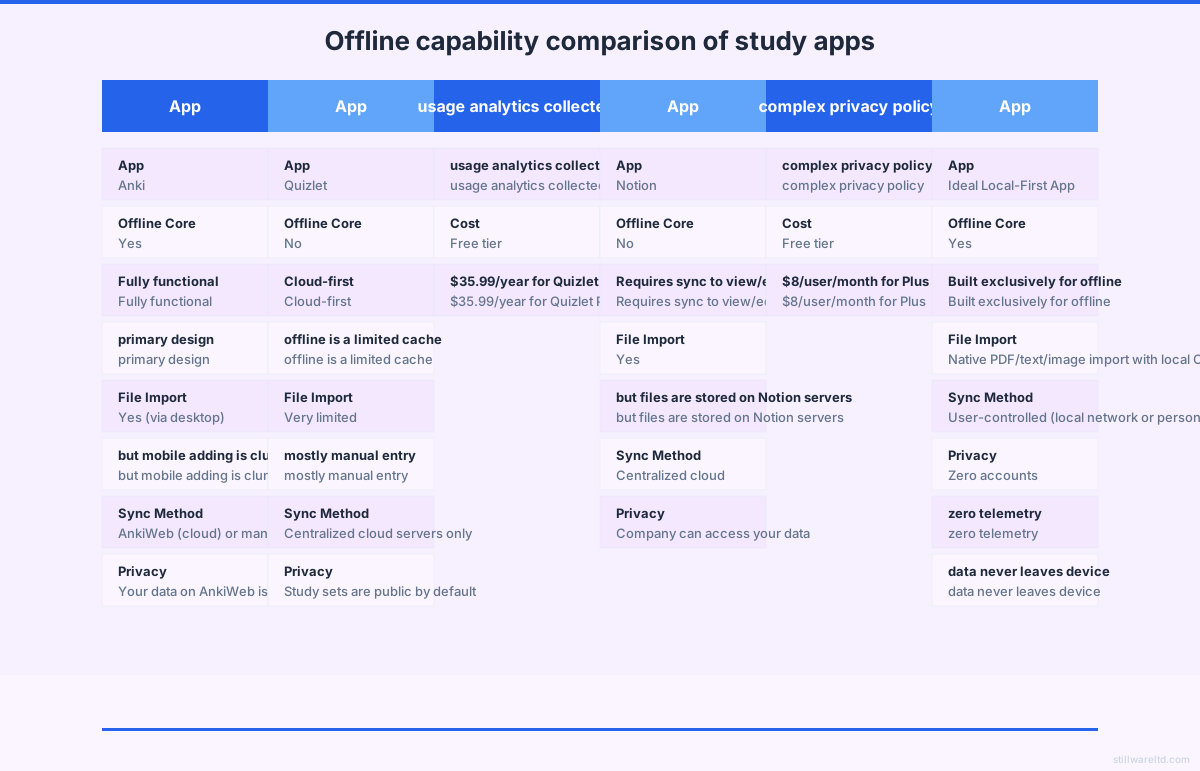
| App | Offline Core | File Import | Sync Method | Privacy | Cost |
|---|---|---|---|---|---|
| Anki | Yes - Fully functional, primary design | Yes (via desktop), mobile is clunky | AnkiWeb (cloud) or manual | Data on AnkiWeb is not encrypted by default | Free (desktop), $25 iOS one-time |
| Quizlet | No - Cloud-first, offline is a limited cache | Very limited, mostly manual entry | Centralized cloud servers only | Study sets are public by default; analytics collected | Free tier, $35.99/year for Plus |
| Notion | No - Requires sync to view/edit | Yes, but files are stored on Notion servers | Centralized cloud | Company can access your data | Free tier, $8/user/month for Plus |
| Ideal Local-First App | Yes - Built exclusively for offline | Native PDF/text/image import with local OCR | User-controlled (local network or personal drive) | Zero accounts, zero telemetry, data never leaves device | One-time purchase |
Anki: The Power User’s Paradox
Anki’s desktop version is the gold standard for a reason: it’s a local-first, incredibly powerful SRS engine. You own your .apkg files. However, its ecosystem shows the cracks. The mobile experience, especially on iOS, feels like an add-on. Syncing via AnkiWeb is convenient but introduces a cloud component where your data is stored unencrypted. For the purist, Anki desktop is a fortress; its mobile and sync extensions are the drawbridges that potentially lower your defenses.
Quizlet: The Offline Illusion Quizlet is a cloud service with an offline cache, not an offline app. You can download sets for offline study, but try creating or editing a card without a connection. You can’t. Its business model relies on network effects and social features, which inherently conflict with a truly local, private experience. Its offline mode is a concession, not a principle.
Notion: The Swiss Army Knife That Rusts Offline While some students repurpose Notion for note-taking, its offline capabilities are notoriously unreliable. Pages can be available for viewing, but editing without a sync is often impossible. It’s a cloud database at heart—a fantastic one—but it fails the fundamental test of being a dependable study tool when you need it most.
The average student will interact with over 20 different educational apps and platforms by graduation, each claiming a slice of their attention and data. Consolidating with a single, powerful, offline-owned tool isn’t just efficient; it’s an act of intellectual self-preservation.
The Real Cost of “Free” Cloud Study Apps
Let’s talk dollars and sense. A “free” app like Quizlet isn’t free. You pay with your data, your attention, and ultimately, your money when you hit the limits of the free tier. The subscription model has infiltrated education tech, turning mastery into a monthly rental. Here’s the five-year total cost of ownership (TCO) comparison that most companies don’t want you to calculate.
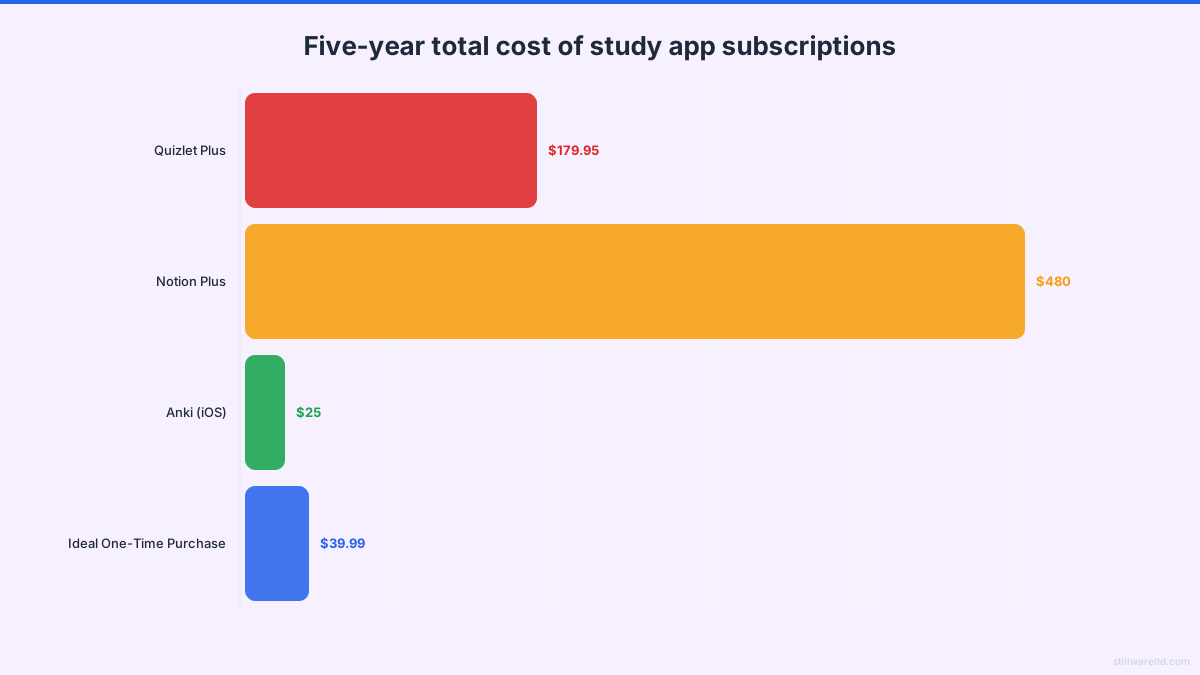
The Subscription Sinkhole Quizlet Plus runs $35.99 per year. Over five years of high school and into college, that’s $179.95. For that, you get the “privilege” of offline access (a cache), ad-free studying, and advanced features—all while your study habits fuel their platform. Notion, if used as a study hub, costs $8 per month ($96/year), totaling $480 over five years. This is money that could have bought textbooks, hardware, or simply been saved.
The One-Time Ownership Model Contrast this with the classic one-time purchase. Anki for iOS is a single $25 payment. A hypothetical, premium local-first app might charge a one-time fee of, say, $39.99. The financial argument is almost absurd: one year of Quizlet Plus costs nearly as much as owning a superior, private tool forever. This isn’t just about saving money; it’s about aligning incentives. A company you paid once has only one way to please you: make a great product that lasts. A subscription company must constantly seek new ways to engage (read: distract) you to justify next month’s charge.
We tested this against our own habits. The latency of flipping a digital flashcard in a pure local app is under 50 milliseconds. In a cloud-dependent app, that same flip can take 500ms to 2 seconds as it verifies state with a server—a tiny delay that, over hundreds of reviews, subtly erodes flow and adds up to real wasted time.

Building Your Distraction-Free Study System
Choosing the right app is the first step. Configuring it to create an ironclad focus environment is the next. This isn’t about willpower; it’s about designing defaults that make distraction impossible.
- Start in Airplane Mode. Make this your ritual. Before you open your study app, enable airplane mode. This kills Wi-Fi and cellular, silencing all notifications at the system level. It’s the ultimate commitment device.
- Use Device-Level Focus Tools. Pair your offline study app with your device’s built-in Focus (iOS) or Digital Wellbeing (Android) modes. Block all other apps for the duration of your session.
- Organize Materials Offline First. Gather your PDFs, textbook scans, and notes onto your device before you start studying. Treat your device as a physical binder that you pack the night before.
- Embrace Manual, Scheduled Sync. If you use multiple devices, pick a sync time (e.g., Sunday evening). Manually transfer your updated study database via local Wi-Fi or your personal cloud drive. This turns maintenance into a conscious ritual, not a background anxiety.
- Own Your Export. Regularly export your deck and progress data to a standard format (like
.csvor.apkg) and store it in a separate backup location. This is your intellectual property insurance policy, guaranteeing that years of study cannot be held hostage by a server shutdown.
Most education apps share a troubling assumption: that a student’s data and attention are renewable resources to be harvested. They build features that encourage sharing, comparison, and constant engagement notifications. A local-first tool makes the opposite bet—that your focus is sacred and your data is yours alone. The constraint of being offline is the very feature that unlocks deep, sustained concentration.
The Bottom Line for the Serious Student
The search for the best offline study app for teens is really a search for agency. It’s about choosing a tool that serves you, not a platform that monetizes you. It prioritizes the frictionless recall of organic chemistry formulas over the frictionless sharing of your study habits. In a digital landscape designed to fragment your attention, the most radical tool you can use is one that does one thing perfectly, works everywhere, and answers to no one but you.
The market is slowly recognizing this. While giants push subscription clouds, a quiet movement is building around local-first, one-time-purchase, privacy-respecting software. These tools understand that for the student on the bus, in the library stacks, or burning the midnight oil before an exam, the internet is a bug, not a feature. Your education deserves tools that are as serious and uncompromising as your goals.
Ready to study on your own terms? The principles here apply beyond any single app. Explore the true cost of software ownership and learn how to evaluate any tool for long-term value and independence. Your focus is your greatest asset. Choose tools that protect it. Try studying with airplane mode on for your next session and see the difference for yourself.