Best Offline Hiking Map App in 2025: 4 Apps Compared
Most hiking apps are built backwards. They assume you’ll have a signal, a subscription, and a willingness to let a company track your every step. The best offline hiking map app treats your phone like a self-contained survival tool, not a data collection device. It works in a deep canyon, on a remote ridgeline, or in a national park where cell towers are a myth. The difference isn’t just about convenience—it’s about the fundamental architecture of trust. After researching dozens of outdoor apps, one pattern stands out: the most popular ones are designed for casual trail walkers who rarely leave the coverage map, not for professionals or serious enthusiasts who venture beyond it.
Let’s set the scene. You’re six miles into a backcountry loop in the Sierra Nevada. The trail forks, and your paper map is buried. You pull out your phone. A cloud-dependent app spins, trying to load vector tiles from a server 200 miles away. Your battery drains 15% searching for a ghost signal. Meanwhile, an app built for this moment displays crisp topographic lines instantly, your pre-downloaded region taking up space on your device, not in some distant data center. This is the divide. We believe outdoor tools should work offline by default. Here’s why: when you’re navigating by GPS in the wilderness, connectivity is a luxury, not a guarantee. Your safety and orientation depend on local data.
What Makes a Truly Offline-First Hiking App?
The term “offline” is thrown around loosely. Many apps offer “offline maps” as a premium feature bolted onto a cloud-centric system. A genuine offline-first app is architected from the ground up to assume zero connectivity. This distinction creates a cascade of practical differences that matter when you’re miles from a trailhead.
A true offline app stores everything locally: the map tiles, your saved waypoints, your recorded tracks, and your field notes. There’s no “syncing” when you get back to service; the data is just there, on your device, waiting to be exported on your terms. The core features break down into non-negotiable categories:
- Map Download Granularity: Can you download a massive, high-detail region (like an entire national forest) or are you stuck downloading individual trails piecemeal?
- Topographic Detail: Does the app show contour lines, elevation shading, slope angle, and hydrological features without a data connection?
- GPS Efficiency: How does the app use your phone’s GPS? Does it drain the battery by constantly phoning home, or does it work efficiently in a pure, local mode?
- Data Ownership: Where does your tracklog—a precise record of your location—end up? Is it uploaded to a company server by default for “analysis”?
- Pricing Model: Are you renting access to maps year-by-year, or did you buy the tool outright?
Most outdoor apps share a troubling assumption about user data: that it’s acceptable to collect your precise location history, trail preferences, and photos to “improve the service” or serve targeted ads. For a tool used in vulnerable, remote locations, this isn’t a minor privacy quirk—it’s a fundamental breach of the self-reliant ethos of hiking. Your route home shouldn’t be a data point in an advertising profile.
4 Best Offline Hiking Map Apps Compared
To find the best offline hiking map app, we need to move past marketing and look at the architecture. Let’s compare four of the most common choices for hikers, evaluating them against the harsh reality of a week-long backpacking trip with no service.
| App | Offline Maps | Map Type | Download Granularity | Pricing | Data Ownership | Best For |
|---|---|---|---|---|---|---|
| Gaia GPS | Yes (Premium) | Vector & Raster Topo | Regions or states | $39.99/year | Uploaded by default | Serious hikers who accept subscription |
| AllTrails | Yes (Pro) | Basic trail maps | Single trails only | $35.99/year | Uploaded by default | Casual day-hikers on known trails |
| OsmAnd | Yes (Core) | OpenStreetMap-based | Entire countries/regions | Free or ~$30 one-time | Local only by default | Budget-conscious & privacy-focused navigators |
| Avenza Maps | Yes (Core) | Geospatial PDFs | Individual map files | Freemium / Map purchases | Local only | Hikers using official paper map PDFs |
Gaia GPS: The Professional Standard (With Strings Attached)
Gaia GPS is arguably the most powerful consumer-grade mapping app available. Its offline capabilities are robust: you can download massive regions in multiple map layers (USGS topo, satellite, public land layers). The detail is exceptional for route planning and off-trail navigation.
However, its power comes with a cloud-centric model. Your data, by default, flows to Gaia’s servers to sync across your devices. This is convenient if you switch between phone and desktop, but it means your precise backcountry routes are stored in their ecosystem. The pricing is strictly subscription-based; stop paying, and you lose access to map updates and cloud syncing (though your downloaded maps may remain). It’s a professional tool, but you’re renting it, and your data is part of the deal.
“The average subscription-based hiking app costs a user over $300 across a decade of use—for software that fundamentally treats your expedition data as a commodity.”
AllTrails: The Social Hiking App (With Offline Limitations)
AllTrails is fantastic for discovering trails and reading reviews. Its offline mode, however, is its weakest link for serious wilderness use. You can only download maps for specific, saved trails. This is useless if you go off-route, decide to explore a side canyon, or need to navigate cross-country in an emergency. The map detail offline is often simplified, lacking the topographic contours essential for safe navigation in complex terrain.
Like Gaia, it’s subscription-based (AllTrails Pro) and deeply integrated with a social cloud. Your hikes are meant to be shared. For a deep woods forager or a peak bagger leaving the established network, this model is misaligned. It’s built for the trail, not for the terrain surrounding it.
OsmAnd: The Power of Open Source (With a Learning Curve)
Built on OpenStreetMap data, OsmAnd is a revelation for the privacy-conscious and budget-aware. You pay a one-time fee (for the full version) and can download entire countries’ worth of map data for free. It works completely offline, stores everything locally, and offers astonishing detail (including topographic contours, hiking trails, and even minor footpaths).
The trade-off is usability. The interface can feel clunky compared to polished competitors. The sheer depth of options is both its strength and its barrier to entry. For someone who takes the time to learn it, OsmAnd provides a level of data sovereignty and one-time-cost freedom that subscription models can’t match. It proves that capable offline navigation doesn’t require an annual fee.
Avenza Maps: The Paper Map Companion
Avenza Maps takes a unique approach. It’s designed to work with georeferenced PDF maps, often the same ones you’d buy as paper maps from park services. You import the map file, and it acts as a moving “You Are Here” dot on that exact map. It’s 100% offline, and your data stays local.
The limitation is you’re tied to the maps you can find and purchase. It’s less about exploring a dynamic map and more about digitizing a specific, static paper map. It’s perfect for hunters, surveyors, or anyone who already navigates with official PDF maps.

The Hidden Costs: Battery, Data, and Long-Term Value
The comparison isn’t just about features on a website. It’s about what happens in your hand, in the field, over years of use.
Battery consumption is a critical metric. Cloud-dependent apps, even in “offline” mode, often keep background services pinging for a signal or waiting to upload data. A pure offline app silences these radios, letting the GPS chip do its job with minimal overhead. On a multi-day trip, this can mean the difference between a dead phone on day two and a functional navigator on day four.
The data ownership model has long-term implications. Consider the lifecycle of a typical startup app. If a subscription-based hiking service shuts down (a common fate), what happens to your years of tracklogs, saved waypoints, and custom maps stored in their cloud? Often, they vanish. A local-first approach means your data lives on your device and your backups. It’s yours forever, independent of any company’s fortunes. This is a lesson we’ve learned from watching other sectors: The True Cost of YNAB Over 5 Years isn’t just financial, it’s about vendor lock-in and data portability.
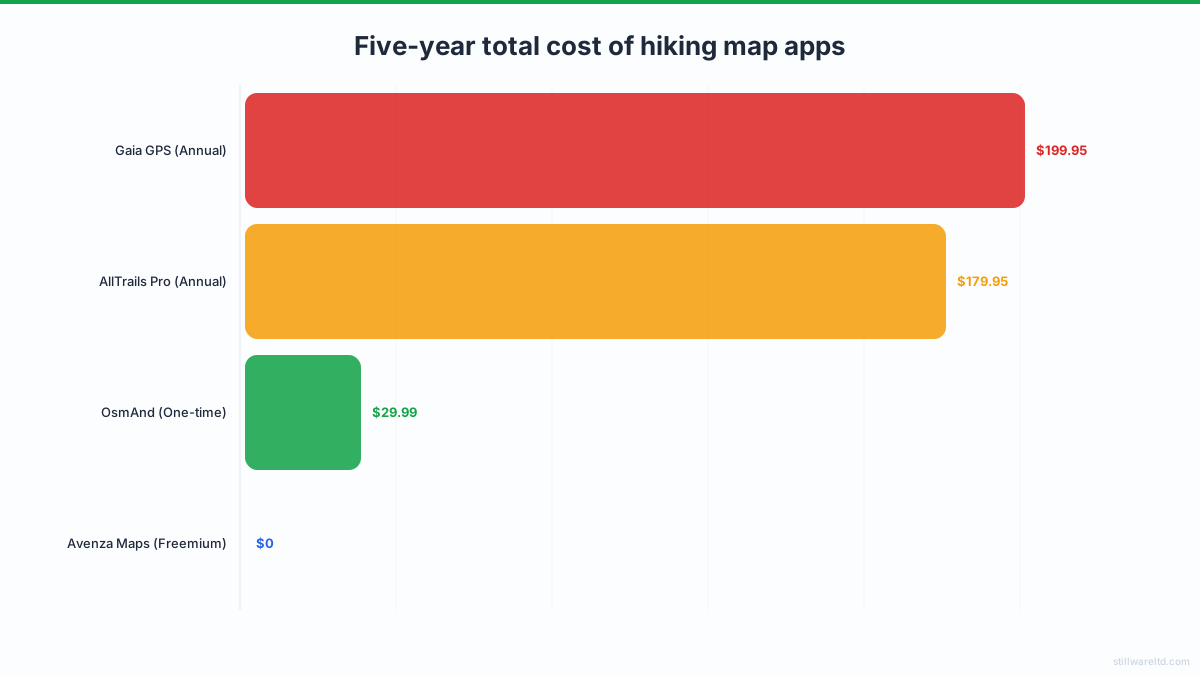
Let’s talk real cost with a five-year total cost of ownership (TCO) analysis:
- Gaia GPS (Annual): $199.95
- AllTrails Pro (Annual): $179.95
- OsmAnd (One-time): $29.99
- Avenza Maps (Freemium): $0 + map purchases
The math is stark. Subscription models quietly turn a tool into a permanent line item. A one-time purchase, even at a higher upfront cost, saves significant money for any hiker who ventures out more than once a year. You’re buying a tool, not entering a lease.
Key Features of the Ideal Offline Hiking Tool
So, what would an app built without compromise for the serious, privacy-minded outdoors person look like? Based on the gaps in the current market, its specifications are clear.
It would start with the assumption of absolute disconnection. Every core function—map rendering, GPS plotting, note-taking, photo geotagging—would be processed on-device. Syncing to a desktop for trip planning or log keeping would happen via a direct cable connection or a user-controlled cloud folder (like your own Google Drive), not a proprietary company server. The business model would be a single, one-time purchase. No subscriptions, no feature gates, no paywalls for updated maps.
Key features would include:
- Bulk Topographic Region Downloads: Download entire USGS quadrangles or national parks in one go, with high-resolution contour lines and terrain shading.
- Low-Power GPS Tracking: A dedicated mode that minimizes battery use by recording tracks at intelligent intervals, not constant maximum precision.
- Integrated Field Journal: The ability to drop a GPS pin, attach a photo of a mushroom or a rock formation, and type notes with a custom keyboard—all without ever needing a signal.
- Data Sovereignty: All files stored in an open, documented format (like GPX for tracks, GeoJSON for waypoints) in a clear folder on your device, making manual backup and export trivial.
- One-Time Purchase Price: Own the software for life, including all core map rendering and tool updates.
This tool wouldn’t try to be a social network. It wouldn’t have “challenges” or “achievements.” Its value would be measured in reliability per ounce of battery and clarity per square inch of screen. It would be boring, professional, and utterly dependable.
How to Choose Your Best Offline Hiking Map App
Your perfect app depends on your priorities. Use this framework to decide.
- Is absolute data privacy your top priority? Choose OsmAnd or Avenza Maps.
- Is convenience and cross-device sync worth a subscription? Consider Gaia GPS.
- Need the most powerful topo tools regardless of cost? Gaia GPS is the industry leader.
- On a tight budget but need reliable maps? OsmAnd (one-time fee) is unmatched.
- Want simplicity for established trails only? AllTrails Pro may suffice.
- Do you navigate with official paper/PDF maps? Avenza Maps is your tool.
For the weekend warrior sticking to popular trails, AllTrails Pro might be enough. For the guide or serious adventurer who needs the best maps and accepts the subscription trade-off, Gaia GPS is the powerhouse. But for the forager, the off-trail explorer, the privacy advocate, or anyone tired of recurring fees, the search points toward the ethos of OsmAnd and the gap in the market it reveals: a polished, high-performance, one-time-purchase app built for true wilderness independence.
The best offline hiking map app is the one that disappears, becoming a seamless extension of your backcountry judgment. It doesn’t distract with social features, nag you for a renewal, or burn your battery searching for a network that doesn’t exist. It simply turns your phone into a capable, self-contained map and logbook. In an era of digital clutter and data extraction, that simplicity isn’t just a feature—it’s the foundation of trust when you’re far from help.
Ready to navigate on your own terms? The trail to truly independent mapping starts with prioritizing the device in your hand over the servers on the internet. Explore your options with a critical eye on their architecture, not just their advertising. Your next adventure deserves a tool that’s as self-reliant as you are. Try downloading OsmAnd or Avenza Maps first—they’re the closest you’ll get to a one-time purchase for true wilderness freedom.