
The $4.99 Lesson
A friend recently downloaded a “free” educational app for his seven-year-old. The child was happily tracing letters when a vibrant, animated ad for a sugary cereal popped up. A few taps later—accidental or not—a $4.99 weekly subscription was charged to the parent’s account. The app was immediately deleted, but the lesson lingered: the true cost of a “free” kids’ app is rarely zero. It’s measured in interruptions, manipulated attention, and the quiet erosion of privacy.
This isn’t an isolated incident; it’s the dominant business model. The children’s app market is a minefield of attention engineering, where your child’s focus is the product being sold to the highest bidder. The search for genuinely good software—tools that educate without exploiting, that engage without addicting—feels increasingly futile.
But they exist. This guide is a roundup of the best offline, ad-free apps for kids in 2026, focused on a simple, radical idea: software that serves the child’s development and the parent’s peace of mind, not a quarterly revenue target. We’ll name the problematic alternatives, highlight the dual benefits of each recommendation, and provide a framework for spotting quality in a market saturated with junk.

Why Offline & Ad-Free Kids Apps Are Essential
Before we list specific apps, it’s critical to understand why these criteria matter. An offline, ad-free app isn’t just “nice to have”; for children’s software, it’s the baseline for ethical design.
An app that requires an internet connection is an app that can—and often does—phone home with data about your child. Every tap, every mistake, every minute spent can be bundled, anonymized (or not), and sold to data brokers who build profiles that will follow them for decades. COPPA compliance is a legal floor, not a ceiling of protection.
Ads break a child’s flow state—the deep concentration where real learning happens. A 2023 study on pediatric attention spans showed that even “educational” interstitials cause a cognitive reset, forcing the brain to disengage from the learning task and process commercial messaging. The result is shallower engagement and faster burnout.
The average “free” kids app generates 15x more revenue from data and ads than a paid app does from its upfront price. You are not the customer; your child’s attention is the inventory.
Consider the practicalities: offline apps work in the car, on airplanes, in rural areas, or in your own basement where Wi-Fi is spotty. They don’t drain the battery searching for a signal, and they won’t suddenly become unusable because a server is down or the developer has gone out of business.
Here’s a breakdown of what you’re actually choosing between:
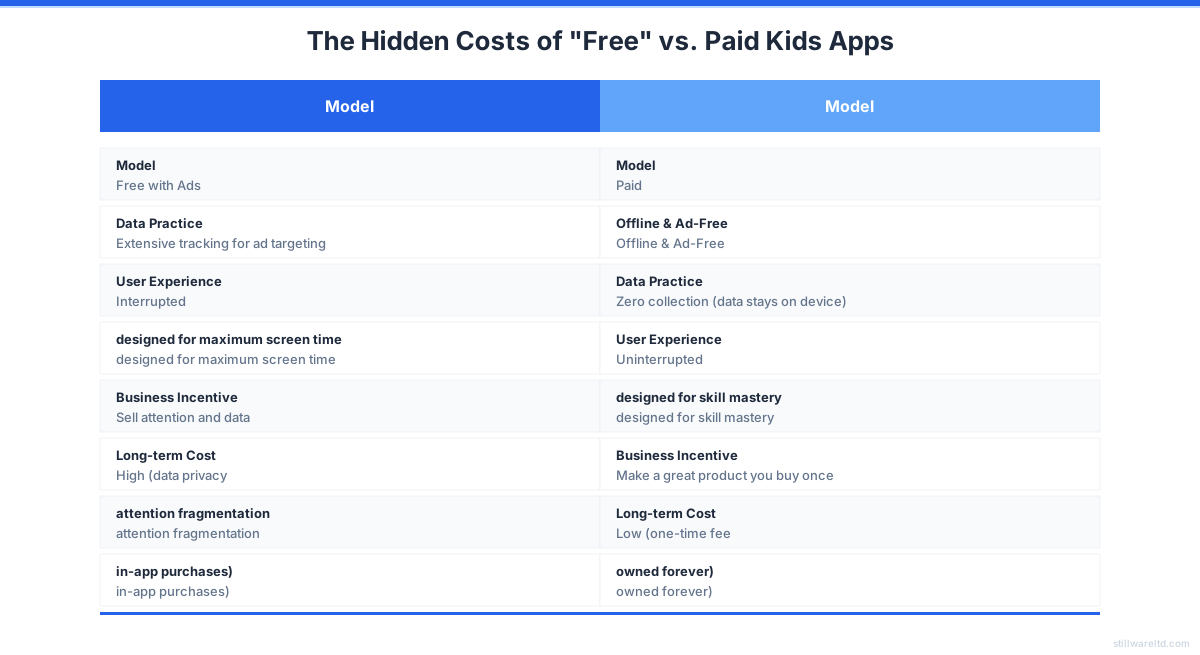
The core shift is from software as a service (exploiting a user) to software as a tool (empowering a user). For a child, the tool should disappear, letting the learning or creation take center stage.
5-Point Checklist for a Great Kids App
With thousands of options, how do you filter for quality? Use this five-point checklist. An app doesn’t need to hit all five perfectly, but the best ones will.
- Zero Network Requirements: The app’s core functionality must be 100% available without Wi-Fi or cellular data. Cloud sync for saves is acceptable only if it’s optional and uses your account (like a parent’s Google Drive), not the developer’s server.
- No Commercial Interruptions: This means zero ads, zero cross-promotions for other apps, and zero “special offers” integrated into the UI. The screen is sacred space for the activity.
- Clear, One-Time Pricing: No subscriptions, no “freemium” walls that lock critical features, no virtual currencies. You pay once, your child gets the whole experience.
- Data Sovereignty: The privacy policy should be simple: “We don’t collect any data.” All progress, creations, and profiles are stored locally on the device. If sync is offered, encryption should be end-to-end.
- Dual-Benefit Design: The app should clearly benefit the child (skill development, creativity, fun) and the parent (peace of mind, no surprises, meaningful engagement reports).

If an app fails more than one of these points, it’s not a tool—it’s a trap. Keep this framework in mind as we explore the best options.
Best Offline Apps for Kids No Ads: 2026 Comparison
| App Name | Category | One-Time Price | Key Feature | Best For |
|---|---|---|---|---|
| Rank Up Chess | Strategy & Logic | ~$9.99 (est.) | 5,000+ puzzles, adjustable AI | Deep strategic thinking, ages 6+ |
| Endless Alphabet | Early Literacy | $8.99 | Whimsical monster-led games | Letter sounds & word building, ages 3-6 |
| Toca Boca Apps | Creative Play | $3.99 - $4.99 per app | Open-ended digital toy boxes | Imaginative play, storytelling, ages 4-8 |
| Khan Academy Kids | Comprehensive Learning | Free (truly) | Vast library of books & activities | Broad curriculum, ages 2-8 |
| Thinkrolls 2 | Logic & Physics | $4.99 | Puzzle platformer with science concepts | Problem-solving, ages 5-9 |
| DragonBox Numbers | Early Math | $7.99 | Number sense through playful manipulation | Foundational math, ages 4-8 |
| Pocket Paint | Creativity | Free / Donation | Simple, powerful drawing tool | Digital art & creativity, all ages |
Detailed Reviews: Top Offline, Ad-Free Picks
This category is the most abused by the ad-supported model. We’re looking for apps that replace traditional toys and workbooks.
1. Rank Up Chess: Offline Strategic Mastery
- The Child’s Benefit: Develops deep strategic thinking, pattern recognition, and patience through a structured curriculum. It moves from “how the horse moves” to analyzing complex endgames. The 5,000+ puzzles and adjustable AI provide a lifelong challenge that scales with skill.
- The Parent’s Benefit: COPPA-compliant with zero data collection. Multiple child profiles on one purchase. No worry about online interactions or toxic chat. The one-time price means you’re not renting access to your child’s education.
- The Problematic Alternative: Most “free” chess apps are loaded with ads after every move, offer “hints” for watching video ads, or push subscriptions for basic analysis. They optimize for addictive gameplay loops, not gradual mastery.
- Developer Insight: After months of building Rank Up Chess, the biggest surprise was how much kids valued the “achievement” system over flashy animations. Beta testers told us the feature they valued most was the post-game analysis—understanding why they lost was more engaging than any cartoon reward. We built for mastery first.
Try Rank Up Chess — Offline Chess Mastery for Kids
Try Rank Up Chess2. Endless Alphabet & Reader (Originator Inc.)
- The Child’s Benefit: Whimsical, monster-led games that teach letter sounds, word construction, and sentence building through playful interaction. The vocabulary is rich and surprising.
- The Parent’s Benefit: A one-time purchase per app. No ads, no in-app purchases. The apps work perfectly offline. You’re buying a digital board book that never wears out.
- The Problematic Alternative: A plethora of “ABC” apps that are essentially ad-delivery vehicles with minimal educational content, often requiring subscriptions for more than a handful of letters.
3. Toca Boca & Sago Mini World (Paid Versions)
- The Child’s Benefit: Open-ended digital toy boxes. They can run a hair salon, build a robot, or explore a mini-world. It’s pure, unstructured imaginative play that fosters creativity and storytelling.
- The Parent’s Benefit: While some titles are moving to a subscription model (Sago Mini World), many individual Toca Boca apps remain a one-time purchase. They are ad-free, safe, and beloved for their inclusivity and gentle humor.
- The Problematic Alternative: Countless “makeover” or “dress-up” games that are front-loaded with ads and push in-app purchases for every new item of clothing, creating a “gotta collect them all” mentality.

5 Red Flags of a Bad Kids App
You can often spot a low-quality, exploitative app before you even download it.
5. The Description Emphasizes “Free” Over Features. If the primary selling point is “FREE GAME!” rather than what the child will learn or create, the developer’s priority is clear: volume of downloads over quality of experience.
4. It Requires an Account for Single-Player Play. There is zero technical reason a solo puzzle or drawing app needs your email address. The only reason to ask is to build a marketing profile or track usage across devices.
3. The Screenshots are Cluttered with Pop-ups and Coins. Look closely at the promotional images. Do you see virtual currency counters, “energy” bars, or “special offer” banners superimposed on the gameplay? That’s the core UI your child will interact with.
2. It Has “In-App Purchases” but No Clear, Upfront Price. This is the “freemium” trap. The app is a demo. The fun parts—the next level, the cool character, the essential tool—are locked behind repetitive grinding or a paywall.
1. The “Offline” Tag is Nowhere to be Found. If the app store listing doesn’t explicitly say “Offline” or “No Internet Required,” it almost certainly needs a connection. This is the biggest predictor of background data collection and ad-serving.
Why One-Time Purchases Save You Hundreds
Let’s move from qualitative to quantitative. The subscription model is creeping into kids’ apps. This is financial insanity when examined over the childhood years.
Assume a modest $4.99/month subscription for an educational app. Over five years—from age 7 to 12—that totals $299.40. For one app. Now imagine you pay a one-time fee of $9.99 for a comparable, offline alternative.
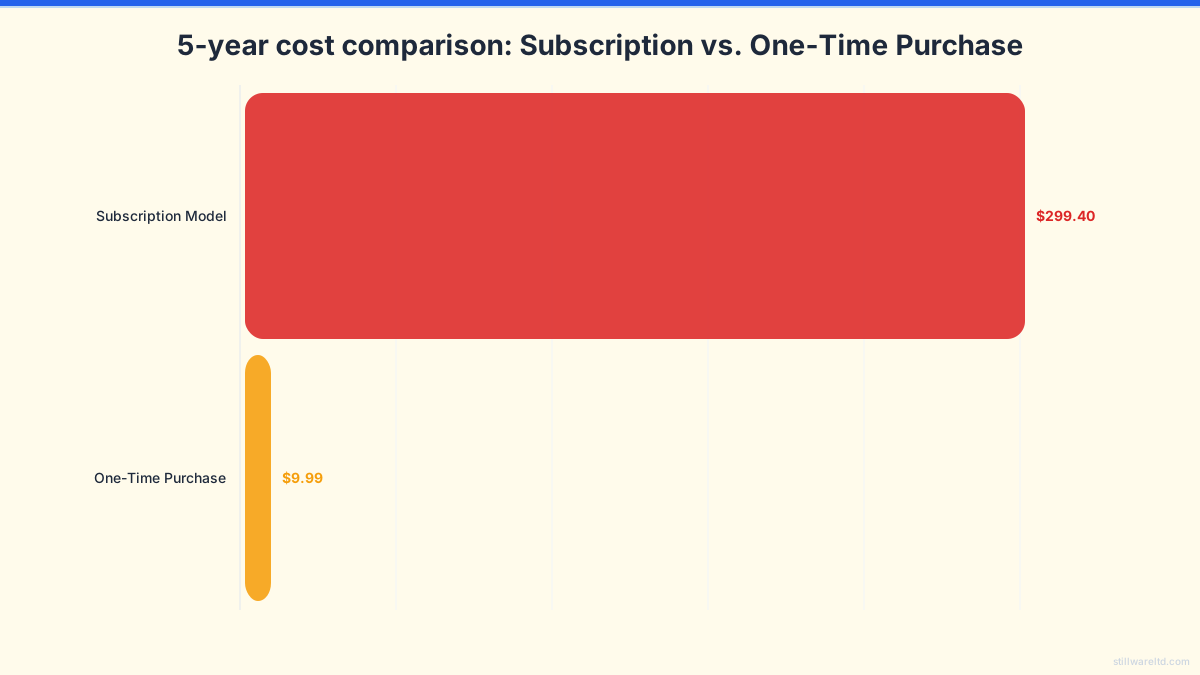
The one-time purchase app costs you 97% less over that period. More importantly, you own it. If the developer stops updating it, the app still works. The subscription app vanishes, along with all your child’s progress, the moment you stop paying.
This isn’t just about budgeting; it’s about ownership versus tenancy. Do you want to rent temporary access to your child’s creative tools, or do you want to build a permanent digital toolkit for them? For a deeper dive into this ownership model, consider the true cost of subscription software over time, which applies just as forcefully to children’s apps.
How to Set Up a Healthy Digital Space
Curating great apps is only half the battle. How they’re used matters just as much.
- Use Device-Level Controls: Leverage “Guided Access” (iOS) or “Screen Pinning” (Android) to lock the device into a single app, preventing accidental exits or purchases.
- Create a Dedicated, Offline Device: Consider using an older tablet with all networking capabilities disabled (Airplane Mode). This becomes a pure “play and learn” device.
- Play Together: The best “feature” of any app is often a parent or caregiver sitting alongside, asking questions, and being part of the discovery.
- Favor Creation Over Consumption: Prioritize apps where the child makes something—a song, a drawing, a chess strategy—over apps where they merely watch or tap mindlessly.
The goal isn’t to eliminate screens but to transform them from portals to ad networks into true tools. The right app doesn’t ask for your child’s data or your ongoing wallet—it just waits patiently on the device, ready to engage their curiosity whenever they are.
The search for the best offline, ad-free apps for kids is an active rejection of an ecosystem designed to distract and extract. It’s a vote for depth over breadth, for ownership over access, and for childhood focus as something to be protected, not packaged and sold. The options are fewer, but their quality is profound. Your child’s attention is worth the hunt.
Ready to see what focused, ethical kids’ software looks like? Explore the principles behind apps that respect their users, and get notified when tools like Rank Up Chess launch to bring offline, mastery-based learning to your family’s device—with a one-time purchase, not a subscription.