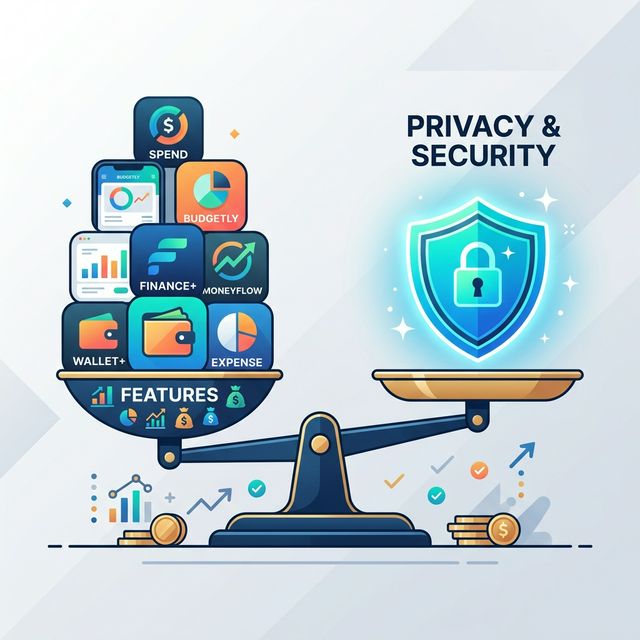
Privacy Budgeting Apps Compared: A Security Architecture Review
The promise of a budgeting app is control, but the reality for most is a trade-off: you gain insights by surrendering your most sensitive data to a company’s cloud. Your transaction history, spending habits, and net worth become a data point in a server farm you don’t own. For the privacy-conscious, this isn’t a minor inconvenience; it’s a fundamental breach of trust. This investigation compares the data handling architectures of leading privacy budgeting apps, revealing that most still require you to trust their cloud, while a select few put you in complete control.
We’ll move beyond marketing claims and examine the technical reality: where is your financial data stored, who holds the encryption keys, and what are you truly agreeing to when you connect your bank? The primary keyword for this deep dive is privacy budgeting apps, and we’ll evaluate each contender on the merits of its architecture, not its slogans.
Data Storage: Device vs. Cloud Security
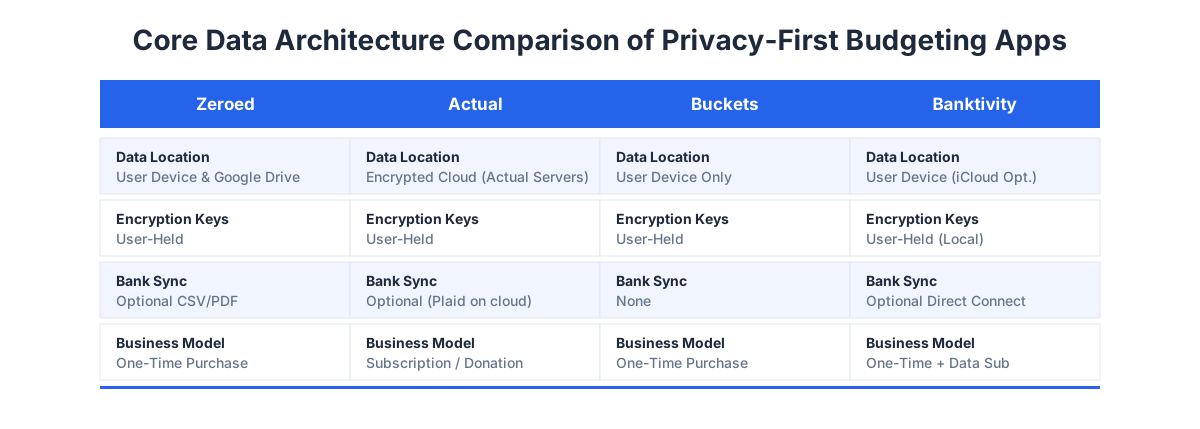
The single most important factor for privacy is location. If your data must travel to and live on a company’s server to be useful, you are inherently trusting that company’s security, policies, and longevity. Privacy budgeting apps that process data exclusively on your device eliminate this entire class of risk.
- The Cloud-Dependent Model (The Majority): Most apps, even those marketed as secure, use a cloud-sync model. Your data is encrypted, sent to their servers, and then synced to your other devices. The security of your life’s financial details now depends on their infrastructure being unhackable and their employees being trustworthy.
- The Local-First, User-Cloud Hybrid Model: This is a nuanced approach taken by some privacy stalwarts. Your data is stored and encrypted on your device first. For syncing, they use a cloud service you control, like iCloud or Google Drive. The app’s company never has access to your sync storage or encryption keys.
- The Strictly Local, Air-Gapped Model: The most private option. Data never leaves your device, period. Syncing across devices is either manual (via file export/import) or non-existent. This offers maximum security but minimum convenience.
The architecture determines the risk profile. An app that never transmits your data to any server, not even one you own, provides a level of privacy that cloud-based apps can only approximate with promises.
Who Holds Your Encryption Keys?
Encryption is not a binary “on/off” feature. The critical question is: who holds the decryption keys? If the service provider holds the keys, they can, in theory, access your data. If you hold the keys, they cannot—even if compelled by law.
- Service-Held Keys: Common in mainstream apps. The company encrypts your data with keys they control. This allows for features like password recovery but means your data is accessible to the company under certain conditions.
- User-Held Keys (Zero-Knowledge Architecture): The gold standard for privacy apps. Your data is encrypted on your device with a key derived from your password, which never leaves your device. The service only ever handles encrypted, unreadable data. They cannot recover your data if you lose your password.
“In a zero-knowledge system, the service is blind to your data. It’s the difference between giving a bank a safe deposit box (they hold the master key) and giving them a welded-shut steel box you locked yourself (they just store the box).”
Full disclosure: we built Zeroed to address this exact problem. Its “Fort Knox” architecture uses military-grade, user-held encryption. Your budget database is encrypted locally before a copy is placed in your personal Google Drive for syncing. We literally cannot decrypt it—only your devices, using your key, can. You can read the technical details in our guide on how Zeroed encrypts your data without a server.
Bank Connections: The Privacy Tightrope
Automated bank imports are the biggest privacy hurdle. The standard method uses a third-party aggregation service (like Plaid, Yodlee, or MX). This requires you to give your banking credentials to this aggregator, granting them broad read-access to your transaction history.
- The Aggregator Risk: You are now trusting two companies with your full financial login. Their privacy policies and security practices become part of your threat model. While convenient, this is a non-starter for many privacy advocates.
- The Offline-First Alternative: The most private apps forgo live connections entirely. They rely on you manually importing transaction files (CSV, QFX, OFX) or using optical character recognition (OCR) to scan PDF statements.
- The Middle Ground: Some apps offer both, letting you choose. This is a fair approach, acknowledging that different users have different risk tolerances.
For users of offline finance apps, manual file import isn’t a limitation; it’s the defining, privacy-preserving feature. It ensures a clean break between your banking infrastructure and your budgeting tool.

Head-to-Head: Top Privacy Budgeting Apps Compared
Let’s apply this framework to specific apps. This isn’t about declaring one “best,” but about matching architecture to user priority.
| Feature / App | Zeroed | Actual | Buckets | Banktivity |
|---|---|---|---|---|
| Primary Data Location | User’s Device | Encrypted Cloud (or Self-Hosted) | User’s Device | User’s Device (iCloud optional) |
| Sync Method | User’s Google Drive | Actual Servers (or your server) | Manual File Sync | Local Network / iCloud |
| Encryption Key Holder | User | User (Zero-Knowledge) | User | User (Local) |
| Bank Import Method | CSV/PDF/OCR Manual Import | Manual Import (Plaid optional on cloud) | Manual Import | Direct Connect & Manual Import |
| Business Model | One-Time Purchase | Subscription (Cloud) / Donation (Self-Host) | One-Time Purchase | One-Time Purchase + Data Sub |
| Best For | Max privacy, multi-device sync via owned cloud, no subs | Techies who self-host, or those who want a private cloud option | Max privacy, single device, simplicity | Mac/iOS ecosystem users wanting deep direct imports |
Analysis:
- Zeroed occupies a unique hybrid: local-first data with sync via a cloud you already use and control (Google Drive). It combines the zero-knowledge encryption of a local app with the multi-device convenience of cloud sync, without ever bringing your data to its own servers.
- Actual (self-hosted) is a powerhouse for technical users who want full control, running their own sync server. Its cloud version is private but subscription-based.
- Buckets is beautifully simple and purely local. Its privacy is absolute, but syncing is a manual process.
- Banktivity is a robust, traditional desktop finance app. Its data is local, and its Direct Connect feature is a more private alternative to Plaid, but it’s primarily for the Apple ecosystem.
The True Cost of Private Budgeting Software
Privacy often has a tangible cost, but it’s not always upfront. A “free” app that uses cloud sync is monetizing your data through aggregation, analytics, or future upsells. A paid, private app aligns its success with your success—you pay for the tool, not the productization of your financial behavior.
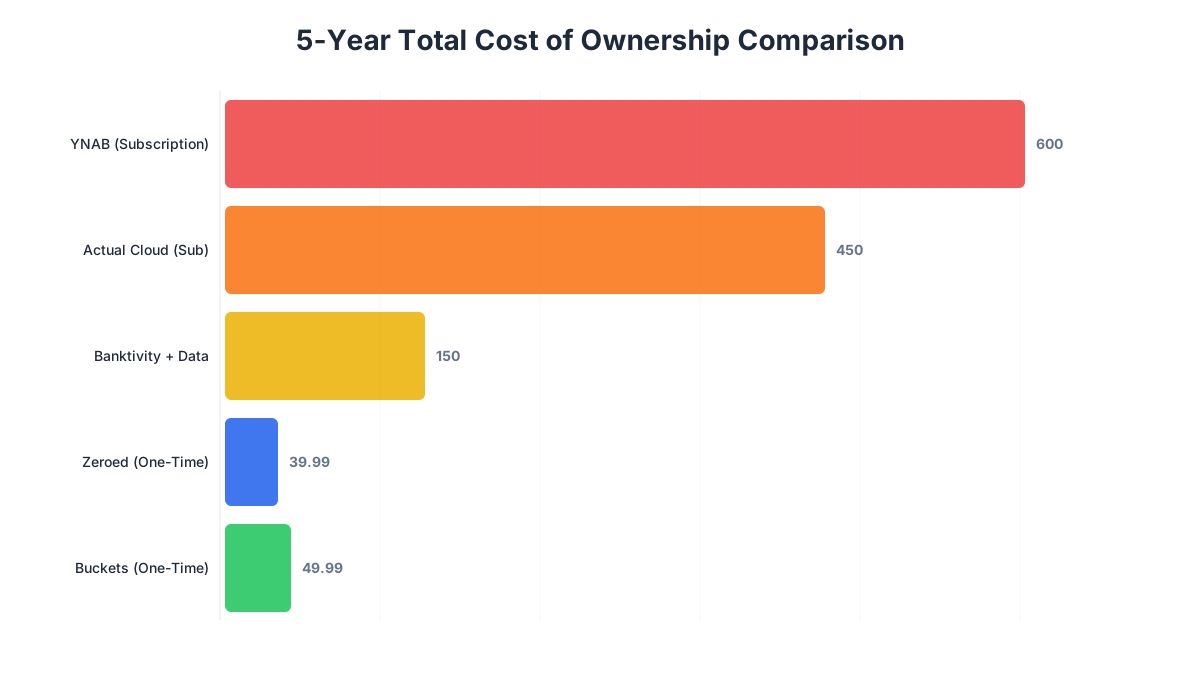
The subscription model common to cloud-based privacy apps creates a recurring decision point. Is the service worth $8-$15 per month, every month, forever? Over five years, that compounds to a significant sum. This recurring cost is a major reason for the rise of one-time purchase models in the privacy space, which we’ve written about in depth regarding the true cost of YNAB over 5 years. It’s a core part of why we don’t do subscriptions.
The most private tools often have a higher upfront cost or require more manual effort because they are selling you software, not a data-harvesting service. This economic alignment is a key feature for the privacy-conscious buyer.
How to Choose the Right Privacy Budgeting App
Your choice depends on how you rank three core priorities: Privacy, Convenience, and Cost. Follow this decision framework:
- Define Your Privacy Non-Negotiables. Is local-only storage mandatory? Are you comfortable with a zero-knowledge cloud, or must you control the sync server yourself?
- Audit the Data Flow. For any app you consider, map out where your data goes: your device -> aggregator? -> app servers? -> your other devices. More steps mean more trust points.
- Test the Import Process. Try manually importing a CSV from your bank. If an app’s manual process is clunky, you’ll be tempted to use less-private automated connections.
- Calculate the 5-Year Cost. Multiply monthly subscriptions by 60. Compare that to one-time purchase fees. Factor in your time for manual data entry if required.
The landscape of privacy budgeting apps is evolving from an afterthought to a primary feature. The trend is moving toward user sovereignty—giving you the keys, letting you choose the storage, and being transparent about data flows. Your budget is a map of your life. You deserve to choose who else gets to see it.
The investigation leads to a clear conclusion: for uncompromising privacy without sacrificing modern sync, a local-first app that leverages your existing cloud storage is the most robust architecture available today. It replaces trust in a corporation with trust in cryptography and your own chosen tools.
Ready to see what private budgeting actually looks like? Try Zeroed free for 34 days—local-first, zero-knowledge encryption, one-time purchase. Your budget, your device, your keys.
Try Zeroed Free — Private Budgeting, No Subscription
Try Zeroed Free